
Cloud environments rarely fail in simple ways. A server may look healthy while an application slows down. A service can return errors even when infrastructure metrics appear normal.
A database may respond slowly because of a dependency several layers away.
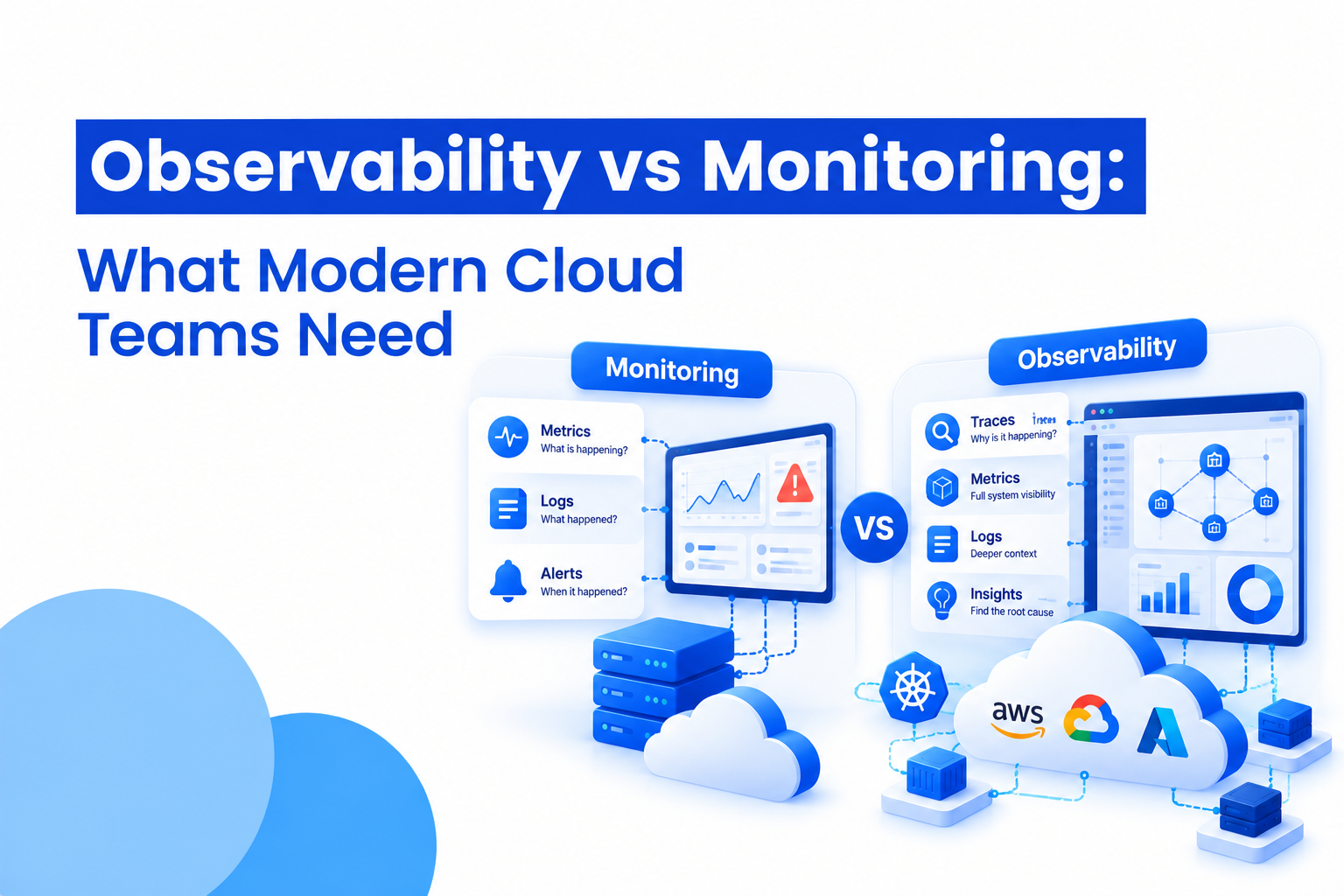
This is where the difference between Observability vs Monitoring becomes important. Monitoring helps teams know when something is wrong. Observability helps them investigate why it is happening, especially when applications run across containers, microservices, APIs, cloud platforms, and distributed systems.
For modern cloud teams, the two approaches are not competing choices. They solve different parts of the same operational problem.
Traditional infrastructure monitoring focuses on measurable signals such as CPU usage, memory, disk space, network traffic, uptime, and server availability. These metrics are extremely useful for identifying known problems.
For example, a monitoring alert might tell an engineer that:
This information gives teams an early warning. Instead of waiting for users to report an outage, engineers can respond when a metric moves outside an expected range.
Monitoring works particularly well when teams already understand the symptoms they are looking for. The challenge begins when the cause of a problem is hidden across several services.
Cloud observability takes a broader approach. Instead of focusing only on predefined alerts, it helps engineers understand what is happening inside complex systems by examining the data produced by applications and infrastructure.
Three major sources are usually involved:
Metrics show numerical changes over time, such as request rates, latency, CPU usage, or error percentages.
Logs provide detailed records of events occurring inside applications and systems. Effective log management makes it easier to search, filter, correlate, and investigate these events.
Traces follow a request as it travels through multiple services. Distributed tracing can reveal where a request slowed down or failed across a microservices architecture.
The real value comes from connecting these signals instead of treating each one as a separate data source.
Imagine an online application where customers suddenly complain that checkout is taking too long.
A monitoring dashboard might immediately show that the servers are healthy. CPU and memory usage are within normal ranges, and no server is down.
That does not mean the application is healthy.
With observability, an engineer can follow an affected request through the system. A trace might show that the checkout service is waiting unusually long for a payment API. Related logs can reveal repeated timeout messages, while metrics show that response latency increased at the same time.
The investigation moves from:
“The application is slow.”
to:
“This particular dependency is increasing checkout latency.”
That difference can significantly reduce troubleshooting time.
A useful way to understand Observability vs Monitoring is to look at the questions each one answers.
Monitoring asks:
Observability asks:
Monitoring is often based on known failure conditions. Observability becomes particularly useful when teams are dealing with unfamiliar or complex failures.
Application performance monitoring (APM) sits closely alongside both approaches. APM focuses specifically on application behavior, helping teams understand areas such as transaction performance, response times, errors, database calls, and service dependencies.
For example, infrastructure monitoring may show that a virtual machine is healthy. APM may reveal that a particular application transaction is taking several seconds because of a slow database query.
Observability expands this view further by connecting application behavior with infrastructure, logs, traces, and other operational signals.
This makes the three concepts complementary rather than interchangeable.
A traditional application may run on a small number of servers where engineers can quickly identify where a problem exists.
Modern cloud applications can be very different. A single user request may pass through an API gateway, authentication service, application service, database, third-party API, queue, and several internal microservices.
A failure in one component can create symptoms somewhere else.
This is where distributed tracing becomes especially valuable. Instead of looking at individual services independently, engineers can follow the path of a request across the system.
The result is a more connected view of application behavior.
Observability does not make logs irrelevant. In many incidents, logs contain the exact details needed to understand an error.
The problem is volume.
Large cloud environments can generate enormous amounts of log data. Without effective log management, finding the relevant event can become difficult.
Useful log management practices include:
When logs, metrics, and traces can be examined together, engineers have more context during an incident.
The answer is not to replace monitoring with observability.
Teams still need monitoring for basic infrastructure health, availability, capacity, and known failure conditions. Alerts help operations teams identify issues quickly and prioritize incidents.
Observability adds another layer. It helps engineers investigate complex behavior that may not trigger an obvious infrastructure alert.
A practical cloud operations setup may therefore include:
Infrastructure monitoring for servers, networks, storage, and cloud resources.
APM for application transactions, errors, latency, and dependencies.
Log management for searchable application and infrastructure events.
Distributed tracing for following requests across services.
Cloud observability for bringing these signals together and creating broader system context.
The Goal Is Faster Understanding
The biggest difference between monitoring and observability is not the number of dashboards a team has. It is how quickly engineers can move from an alert to an explanation.
Monitoring can tell a team that something has changed.
Observability can help explain what changed, where it happened, what it affected, and how different components are connected.
For simple environments, traditional monitoring may cover most operational needs. As systems become more distributed and interconnected, observability becomes increasingly useful for understanding problems that cannot be explained by a single metric.
Final Thoughts
Observability vs Monitoring is not really about choosing one over the other. Modern cloud teams often need both.
Monitoring provides visibility into known conditions and helps detect operational problems. Observability gives engineers deeper context when the cause is unclear.
When infrastructure metrics, application data, logs, and traces work together, teams can investigate incidents with a much clearer picture of what is happening across the cloud environment.
Is observability the same as monitoring?
No. Monitoring focuses on detecting known conditions through metrics, alerts, and predefined checks. Observability uses metrics, logs, traces, and other system data to help teams investigate why unexpected behavior is occurring.
What are the main pillars of cloud observability?
The commonly used pillars are metrics, logs, and traces. Metrics show numerical system behavior, logs record events, and traces follow requests across services. Together, they provide broader context for troubleshooting.
Does observability replace infrastructure monitoring?
No. Infrastructure monitoring remains important for tracking servers, networks, storage, availability, and resource usage. Observability adds deeper context for understanding application and system behavior.
Why is distributed tracing useful?
Distributed tracing helps engineers follow individual requests as they move through multiple services. It can show where latency, errors, or dependency failures occur in complex microservices environments.
Do small cloud teams need observability?
It depends on the complexity of the environment. A small application with a few services may need only basic monitoring initially. As applications become more distributed, observability can make troubleshooting and incident investigation easier.









 India
India

 Canada
 United Kingdom
 New Zealand
 USA
USA
 UAE
UAE
 SGP
SGP
 Australia
 CALL
NOW
CALL
NOW